Making an extension for AI using AI
August 02, 2025 | ~5 mins read
Introduction
 I don't know front-end. I am being candid when I admit that I lack a deep understanding of the front-end, including state management, responsive design, built tools and frameworks, etc. But I built this blog from online tutorials and some [inspiration]( "read copy+pasting"), so [how hard]( "turns out, very hard") can it be to make a chrome extension? So let's try make an AI browser extension using AI.
Disclamer
If you are novice or a no-coder, you'll feel lost. This is a blog for SWE with some understanding of LLMs, self-hosted LLMs, lang-chain, etc.
Why Gemini
There is an old saying, use the right tool for the job. I want to make an extension, simple. I don't need Claude to write me Linux kernels. The project is being built from scratch so Gemini can take a few liberties in implementations. It has a huge 1M token context window that is more than sufficient. Gemini-2.5-Pro is fast, reliable, vastly supported and cheap. So I signed up for google AI studio and got my API key and started working.
Why lang-chain
It is easy, well documented, available for both node-js and python and industry standard a this point. I'm lazy, I will leverage any library, etc that is availbe to help with fast TTM. Also we need not worry about bloating out build file as turbo is very efficient and prunes all the crap out. We'll also use only puppeteer-core to avoid additional selenium.
The structure
It took me multiple iterations to finalise on the structure, with finalising on a simple 2 part structure.
Part 1
Part 1: Pages
.
├── pages
│   ├── content
│   │   ├── public
│   │   │   └── _content.css
│   │   ├── src
│   │   │   └── index.ts
│   │   ├── tsconfig.json
│   │   └── vite.config.mts
│   ├── options
│   │   ├── index.html
│   │   ├── public
│   │   │   └── _options.css
│   │   ├── src
│   │   │   ├── components
│   │   │   ├── index.css
│   │   │   ├── index.tsx
│   │   │   ├── Options.css
│   │   │   └── Options.tsx
│   │   ├── tailwind.config.ts
│   │   ├── tsconfig.json
│   │   └── vite.config.mts
│   └── side-panel
│       ├── index.html
│       ├── public
│       │   └── icons
│       ├── src
│       │   ├── components
│       │   ├── constants
│       │   ├── index.css
│       │   ├── index.tsx
│       │   ├── SidePanel.css
│       │   ├── SidePanel.tsx
│       │   ├── types
│       │   └── utils.ts
│       ├── tailwind.config.ts
│       ├── tsconfig.json
│       └── vite.config.mts
This handles the relatively familiar process of making a node-js app. The app has a side-panel for different components like personal information page, user UI elements and simple tasks like state change and theme switching. I am unaware of the complexities of front-end design so I leveraged Gemini to make the front-end for me. It implemented the different option pages, components, etc. which are mostly static and aren't really interesting.
In 2 words, UI changes mutate the data like user name, profile picture, etc. that is updated and stored in browser storage. Chrome extension reads the data from browser storage for information about themes, etc. Using react hooks, we make this responsive.
Part 2
Part 2: Chrome extension
.
├── chrome-extension
│   ├── manifest.js
│   ├── public
│   │   ├── bg.jpg
│   │   ├── buildDomTree.js
│   │   ├── chirag.png
│   │   ├── icon-128.png
│   │   ├── icon-32.png
│   │   └── permission
│   │       ├── index.html
│   │       └── permission.js
│   ├── src
│   │   └── background
│   │       ├── agent
│   │       ├── browser
│   │       ├── index.ts
│   │       ├── log.ts
│   │       ├── services
│   │       └── utils.ts
│   ├── tsconfig.json
│   ├── utils
│   │   ├── plugins
│   │   │   └── make-manifest-plugin.ts
│   │   └── refresh.js
│   └── vite.config.mts
The src/background directory is our point-of-interest. It runs async, and has utils and some services for offlaoding the boring work. Let's take a deep dive into agent & browser, that's where the magic happens.
ReAct Agentic Model
A framework that combines the reasoning capabilities of LLMS with the ability to take actions using external tools. The process is a continuous cycle of three steps:
- Thought: which we'll call planner
- Action: that's the navigator
- Observation: Doing action and giving information to the LLm about what happened.
Additionally, once the terminal stage is reached the the
validatorkicks in to validate if the user request was fulfilled.
The HLD is as below:
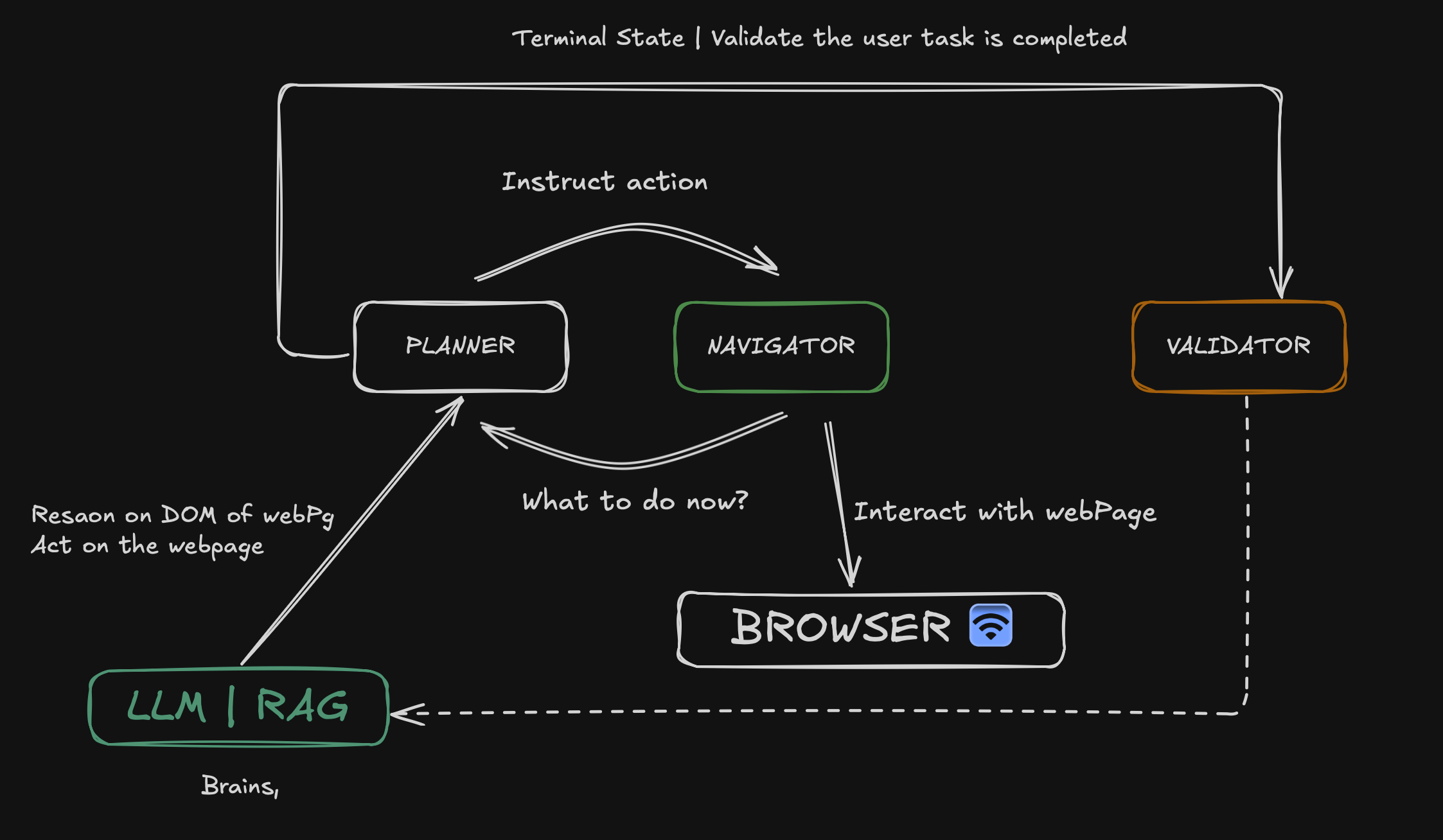
The planner asks what to do from LLM, the context provided may include DOM of the page (and attached browser context). The instructions are passed to the navigator to interact with the browser, updated state is fed back to planner for next steps. Once the terminal state is reached. Don't ask how LLM does this, even I am not sure how this magic happens in the LLM. Once the LLM decides that task is successfully completed, the validator has a few prompts to reassert that the final task is completed. Post affirmation, the result is shared with the user.
Structure of agent
agents
├── base.ts
├── errors.ts
├── navigator.ts
├── planner.ts
└── validator.ts
As all the sub-agents are part of the LLM call, we create a base class and then extend it to the 3 agents: planner, navigator and validator. error.ts has the generic errors (nothing out of the blue). The different tasks associated with each are as follows:
planner: plan the task, ask LLM for next instructionsnavigator: navigate the page, give sanitized page DOM (with browser context) to LLMvalidator: validate the final output, rerun the information to LLM for concise, final answer and formatting.
Structure of browser
.
├── context.ts
├── dom
│   ├── clickable
│   │   └── service.ts
│   ├── history
│   │   ├── service.ts
│   │   └── view.ts
│   ├── raw_types.ts
│   ├── service.ts
│   └── views.ts
├── page.ts
├── util.ts
└── views.ts
This is a more of a helper service that handles task like:
- fetching the tabs in the browser
- sanitizing, click filtering DOM, history, and interaction
- functions:
goto,createPage,attachPage, add or remove listerner events, etc.
Majority of the code imporoves on the core concept of making the ReACT loop. A few techniques are to cache the DOM of all visited pages for the request, trying to work with opened tabs, creating robust recall mchanism for fetching cached information, etc. Services like validating tool_call response, enforcing schema for response, repairing broken json, to name a few makes this robust.
Conclusion
Yeah most of it is done. Now what remians is seeing it in action.